1 Adaptive RAG
이 튜토리얼은 Adaptive RAG(Adaptive Retrieval-Augmented Generation)의 구현을 다룹니다.
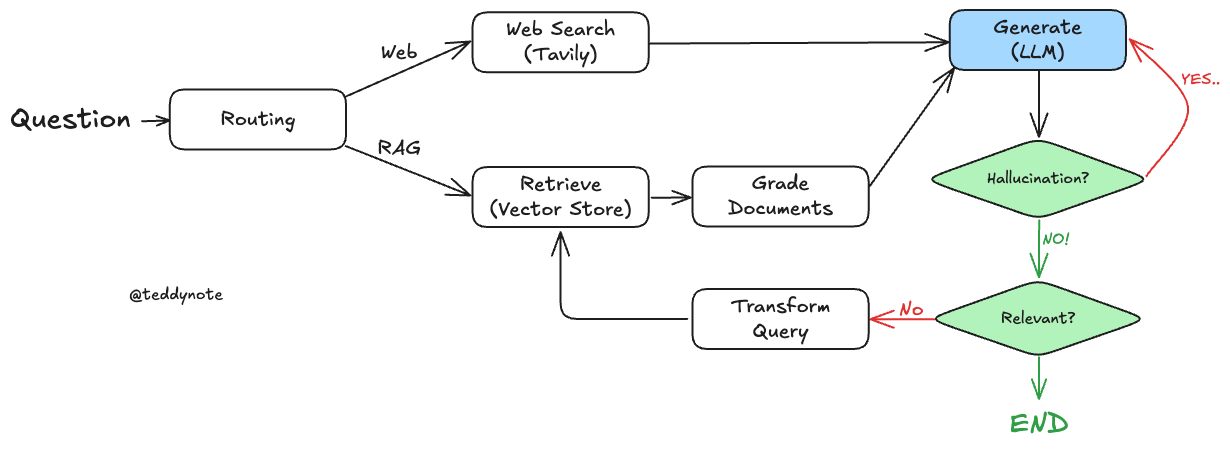
Adaptive RAG는 쿼리 분석과 능동적/자기 수정 RAG를 결합하여 다양한 데이터 소스에서 정보를 검색하고 생성하는 전략입니다.
이 튜토리얼에서는 LangGraph를 사용하여 웹 검색과 자기 수정 RAG 간의 라우팅을 구현합니다.
주로 다루는 내용
- Create Index: 인덱스 생성 및 문서 로드
- LLMs: LLM을 사용한 쿼리 라우팅 및 문서 평가
- Web Search Tool: 웹 검색 도구 설정
- Construct the Graph: 그래프 상태 및 흐름 정의
- Compile Graph: 그래프 컴파일 및 워크플로우 구축
- Use Graph: 그래프 실행 및 결과 확인
Adaptive RAG는 RAG의 전략으로, (1) 쿼리 분석과 (2) Self-Reflective RAG을 결합합니다.
논문: Adaptive-RAG: Learning to Adapt Retrieval-Augmented Large Language Models through Question Complexity 에서는 쿼리 분석을 통해 다음과 같은 라우팅을 수행합니다.
No RetrievalSingle-shot RAGIterative RAG
LangGraph를 사용하여 이를 구현합니다.
이 구현에서는 다음과 같은 라우팅을 수행합니다.
- 웹 검색: 최신 이벤트와 관련된 질문에 사용
- 자기 수정 RAG: 인덱스와 관련된 질문에 사용
1.1 환경 설정
1.2 기본 PDF 기반 Retrieval Chain 생성
여기서는 PDF 문서를 기반으로 Retrieval Chain 을 생성합니다. 가장 단순한 구조의 Retrieval Chain 입니다.
단, LangGraph 에서는 Retirever 와 Chain 을 따로 생성합니다. 그래야 각 노드별로 세부 처리를 할 수 있습니다.
참고
- 이전 튜토리얼에서 다룬 내용이므로, 자세한 설명은 생략합니다.
1.3 쿼리 라우팅과 문서 평가
LLMs 단계에서는 쿼리 라우팅과 문서 평가를 수행합니다. 이 과정은 Adaptive RAG의 중요한 부분으로, 효율적인 정보 검색과 생성에 기여합니다.
- 쿼리 라우팅: 사용자의 쿼리를 분석하여 적절한 정보 소스로 라우팅합니다. 이를 통해 쿼리의 목적에 맞는 최적의 검색 경로를 설정할 수 있습니다.
- 문서 평가: 검색된 문서의 품질과 관련성을 평가하여 최종 결과의 정확성을 높입니다. 이 과정은 LLMs의 성능을 극대화하는 데 필수적입니다.
이 단계는 Adaptive RAG의 핵심 기능을 지원하며, 정확하고 신뢰할 수 있는 정보 제공을 목표로 합니다.
from typing import Literal

from langchain_core.prompts import ChatPromptTemplate
from pydantic import BaseModel, Field
from langchain_openai import ChatOpenAI
from langchain_teddynote.models import get_model_name, LLMs

# 최신 LLM 모델 이름 가져오기
MODEL_NAME = get_model_name(LLMs.GPT4)


# 사용자 쿼리를 가장 관련성 높은 데이터 소스로 라우팅하는 데이터 모델
class RouteQuery(BaseModel):
    """Route a user query to the most relevant datasource."""

    # 데이터 소스 선택을 위한 리터럴 타입 필드
    datasource: Literal["vectorstore", "web_search"] = Field(
        ...,
        description="Given a user question choose to route it to web search or a vectorstore.",
    )


# LLM 초기화 및 함수 호출을 통한 구조화된 출력 생성
llm = ChatOpenAI(model=MODEL_NAME, temperature=0)
structured_llm_router = llm.with_structured_output(RouteQuery)

# 시스템 메시지와 사용자 질문을 포함한 프롬프트 템플릿 생성
system = """You are an expert at routing a user question to a vectorstore or web search.
The vectorstore contains documents related to DEC 2023 AI Brief Report(SPRI) with Samsung Gause, Anthropic, etc.
Use the vectorstore for questions on these topics. Otherwise, use web-search."""

# Routing 을 위한 프롬프트 템플릿 생성
route_prompt = ChatPromptTemplate.from_messages(
    [
        ("system", system),
        ("human", "{question}"),
    ]
)

# 프롬프트 템플릿과 구조화된 LLM 라우터를 결합하여 질문 라우터 생성
question_router = route_prompt | structured_llm_router
다음은 쿼리 라우팅 결과를 테스트 해본 뒤 결과를 확인합니다.
# 문서 검색이 필요한 질문
print(
    question_router.invoke(
        {"question": "AI Brief 에서 삼성전자가 만든 생성형 AI 의 이름은?"}
    )
)1.3.1 검색 평가기(Retrieval Grader)
from pydantic import BaseModel, Field
from langchain_openai import ChatOpenAI
from langchain_core.prompts import ChatPromptTemplate


# 문서 평가를 위한 데이터 모델 정의
class GradeDocuments(BaseModel):
    """Binary score for relevance check on retrieved documents."""

    binary_score: str = Field(
        description="Documents are relevant to the question, 'yes' or 'no'"
    )


# LLM 초기화 및 함수 호출을 통한 구조화된 출력 생성
llm = ChatOpenAI(model=MODEL_NAME, temperature=0)
structured_llm_grader = llm.with_structured_output(GradeDocuments)

# 시스템 메시지와 사용자 질문을 포함한 프롬프트 템플릿 생성
system = """You are a grader assessing relevance of a retrieved document to a user question. \n
    If the document contains keyword(s) or semantic meaning related to the user question, grade it as relevant. \n
    It does not need to be a stringent test. The goal is to filter out erroneous retrievals. \n
    Give a binary score 'yes' or 'no' score to indicate whether the document is relevant to the question."""

grade_prompt = ChatPromptTemplate.from_messages(
    [
        ("system", system),
        ("human", "Retrieved document: \n\n {document} \n\n User question: {question}"),
    ]
)

# 문서 검색결과 평가기 생성
retrieval_grader = grade_prompt | structured_llm_grader
생성한 retrieval_grader 를 사용하여 문서 검색결과를 평가합니다.
# 사용자 질문 설정
question = "삼성전자가 만든 생성형 AI 의 이름은?"

# 질문에 대한 관련 문서 검색
docs = pdf_retriever.invoke(question)1.3.2 답변 생성을 위한 RAG 체인 생성
from langchain import hub
from langchain_core.output_parsers import StrOutputParser
from langchain_openai import ChatOpenAI

# LangChain Hub에서 프롬프트 가져오기(RAG 프롬프트는 자유롭게 수정 가능)
prompt = hub.pull("teddynote/rag-prompt")

# LLM 초기화
llm = ChatOpenAI(model_name=MODEL_NAME, temperature=0)


# 문서 포맷팅 함수
def format_docs(docs):
    return "\n\n".join(
        [
            f'<document><content>{doc.page_content}</content><source>{doc.metadata["source"]}</source><page>{doc.metadata["page"]+1}</page></document>'
            for doc in docs
        ]
    )


# RAG 체인 생성
rag_chain = prompt | llm | StrOutputParser()
이제 생성한 rag_chain 에 질문을 전달하여 답변을 생성합니다.
1.3.3 답변의 Hallucination 체커 추가
# 할루시네이션 체크를 위한 데이터 모델 정의
class GradeHallucinations(BaseModel):
    """Binary score for hallucination present in generation answer."""

    binary_score: str = Field(
        description="Answer is grounded in the facts, 'yes' or 'no'"
    )


# 함수 호출을 통한 LLM 초기화
llm = ChatOpenAI(model=MODEL_NAME, temperature=0)
structured_llm_grader = llm.with_structured_output(GradeHallucinations)

# 프롬프트 설정
system = """You are a grader assessing whether an LLM generation is grounded in / supported by a set of retrieved facts. \n
    Give a binary score 'yes' or 'no'. 'Yes' means that the answer is grounded in / supported by the set of facts."""

# 프롬프트 템플릿 생성
hallucination_prompt = ChatPromptTemplate.from_messages(
    [
        ("system", system),
        ("human", "Set of facts: \n\n {documents} \n\n LLM generation: {generation}"),
    ]
)

# 환각 평가기 생성
hallucination_grader = hallucination_prompt | structured_llm_grader
생성한 hallucination_grader 를 사용하여 생성된 답변의 환각 여부를 평가합니다.
# 평가기를 사용하여 생성된 답변의 환각 여부 평가
hallucination_grader.invoke({"documents": docs, "generation": generation})
class GradeAnswer(BaseModel):
"""Binary scoring to evaluate the appropriateness of answers to questions"""
binary_score: str = Field(
description="Indicate 'yes' or 'no' whether the answer solves the question"
)
# 함수 호출을 통한 LLM 초기화
llm = ChatOpenAI(model=MODEL_NAME, temperature=0)
structured_llm_grader = llm.with_structured_output(GradeAnswer)
# 프롬프트 설정
system = """You are a grader assessing whether an answer addresses / resolves a question \n
Give a binary score 'yes' or 'no'. Yes' means that the answer resolves the question."""
answer_prompt = ChatPromptTemplate.from_messages(
[
("system", system),
("human", "User question: \n\n {question} \n\n LLM generation: {generation}"),
]
)
# 프롬프트 템플릿과 구조화된 LLM 평가기를 결합하여 답변 평가기 생성
answer_grader = answer_prompt | structured_llm_grader1.3.4 쿼리 재작성(Query Rewriter)
from langchain_openai import ChatOpenAI
from langchain_core.prompts import ChatPromptTemplate
from langchain_core.output_parsers import StrOutputParser

# LLM 초기화
llm = ChatOpenAI(model=MODEL_NAME, temperature=0)

# Query Rewriter 프롬프트 정의(자유롭게 수정이 가능합니다)
system = """You a question re-writer that converts an input question to a better version that is optimized \n
for vectorstore retrieval. Look at the input and try to reason about the underlying semantic intent / meaning."""

# Query Rewriter 프롬프트 템플릿 생성
re_write_prompt = ChatPromptTemplate.from_messages(
    [
        ("system", system),
        (
            "human",
            "Here is the initial question: \n\n {question} \n Formulate an improved question.",
        ),
    ]
)

# Query Rewriter 생성
question_rewriter = re_write_prompt | llm | StrOutputParser()
생성한 question_rewriter 에 질문을 전달하여 개선된 질문을 생성합니다.
1.3.5 웹 검색 도구
웹 검색 도구는 Adaptive RAG의 중요한 구성 요소로, 최신 정보를 검색하는 데 사용됩니다. 이 도구는 사용자가 최신 이벤트와 관련된 질문에 대해 신속하고 정확한 답변을 얻을 수 있도록 지원합니다.
- 설정: 웹 검색 도구를 설정하여 최신 정보를 검색할 수 있도록 준비합니다.
- 검색 수행: 사용자의 쿼리를 기반으로 웹에서 관련 정보를 검색합니다.
- 결과 분석: 검색된 결과를 분석하여 사용자의 질문에 가장 적합한 정보를 제공합니다.
from langchain_teddynote.tools.tavily import TavilySearch

# 웹 검색 도구 생성
web_search_tool = TavilySearch(max_results=3)
웹 검색 도구를 실행하여 결과를 확인합니다.
1.4 그래프 구성
1.4.1 그래프 상태 정의
from typing import List
from typing_extensions import TypedDict, Annotated


# 그래프의 상태 정의
class GraphState(TypedDict):
    """
    그래프의 상태를 나타내는 데이터 모델

    Attributes:
        question: 질문
        generation: LLM 생성된 답변
        documents: 도큐먼트 리스트
    """

    question: Annotated[str, "User question"]
    generation: Annotated[str, "LLM generated answer"]
    documents: Annotated[List[str], "List of documents"]
1.5 그래프 흐름 정의
그래프 흐름을 정의하여 Adaptive RAG의 작동 방식을 명확히 합니다. 이 단계에서는 그래프의 상태와 전환을 설정하여 쿼리 처리의 효율성을 높입니다.
- 상태 정의: 그래프의 각 상태를 명확히 정의하여 쿼리의 진행 상황을 추적합니다.
- 전환 설정: 상태 간의 전환을 설정하여 쿼리가 적절한 경로를 따라 진행되도록 합니다.
- 흐름 최적화: 그래프의 흐름을 최적화하여 정보 검색과 생성의 정확성을 향상시킵니다.
1.5.1 노드 정의
from langchain_core.documents import Document


# 문서 검색 노드
def retrieve(state):
    print("==== [RETRIEVE] ====")
    question = state["question"]

    # 문서 검색 수행
    documents = pdf_retriever.invoke(question)
    return {"documents": documents}


# 답변 생성 노드
def generate(state):
    print("==== [GENERATE] ====")
    # 질문과 문서 검색 결과 가져오기
    question = state["question"]
    documents = state["documents"]

    # RAG 답변 생성
    generation = rag_chain.invoke({"context": documents, "question": question})
    return {"generation": generation}


# 문서 관련성 평가 노드
def grade_documents(state):
    print("==== [CHECK DOCUMENT RELEVANCE TO QUESTION] ====")
    # 질문과 문서 검색 결과 가져오기
    question = state["question"]
    documents = state["documents"]

    # 각 문서에 대한 관련성 점수 계산
    filtered_docs = []
    for d in documents:
        score = retrieval_grader.invoke(
            {"question": question, "document": d.page_content}
        )
        grade = score.binary_score
        if grade == "yes":
            print("---GRADE: DOCUMENT RELEVANT---")
            # 관련성이 있는 문서 추가
            filtered_docs.append(d)
        else:
            # 관련성이 없는 문서는 건너뛰기
            print("---GRADE: DOCUMENT NOT RELEVANT---")
            continue
    return {"documents": filtered_docs}


# 질문 재작성 노드
def transform_query(state):
    print("==== [TRANSFORM QUERY] ====")
    # 질문과 문서 검색 결과 가져오기
    question = state["question"]
    documents = state["documents"]

    # 질문 재작성
    better_question = question_rewriter.invoke({"question": question})
    return {"question": better_question}


# 웹 검색 노드
def web_search(state):
    print("==== [WEB SEARCH] ====")
    # 질문과 문서 검색 결과 가져오기
    question = state["question"]

    # 웹 검색 수행
    web_results = web_search_tool.invoke({"query": question})
    web_results_docs = [
        Document(
            page_content=web_result["content"],
            metadata={"source": web_result["url"]},
        )
        for web_result in web_results
    ]

    return {"documents": web_results_docs}
1.6 추가 노드 정의
# 질문 라우팅 노드
def route_question(state):
    print("==== [ROUTE QUESTION] ====")
    # 질문 가져오기
    question = state["question"]
    # 질문 라우팅
    source = question_router.invoke({"question": question})
    # 질문 라우팅 결과에 따른 노드 라우팅
    if source.datasource == "web_search":
        print("==== [ROUTE QUESTION TO WEB SEARCH] ====")
        return "web_search"
    elif source.datasource == "vectorstore":
        print("==== [ROUTE QUESTION TO VECTORSTORE] ====")
        return "vectorstore"


# 문서 관련성 평가 노드
def decide_to_generate(state):
    print("==== [DECISION TO GENERATE] ====")
    # 문서 검색 결과 가져오기
    filtered_documents = state["documents"]

    if not filtered_documents:
        # 모든 문서가 관련성 없는 경우 질문 재작성
        print(
            "==== [DECISION: ALL DOCUMENTS ARE NOT RELEVANT TO QUESTION, TRANSFORM QUERY] ===="
        )
        return "transform_query"
    else:
        # 관련성 있는 문서가 있는 경우 답변 생성
        print("==== [DECISION: GENERATE] ====")
        return "generate"


def hallucination_check(state):
    print("==== [CHECK HALLUCINATIONS] ====")
    # 질문과 문서 검색 결과 가져오기
    question = state["question"]
    documents = state["documents"]
    generation = state["generation"]

    # 환각 평가
    score = hallucination_grader.invoke(
        {"documents": documents, "generation": generation}
    )
    grade = score.binary_score

    # Hallucination 여부 확인
    if grade == "yes":
        print("==== [DECISION: GENERATION IS GROUNDED IN DOCUMENTS] ====")

        # 답변의 관련성(Relevance) 평가
        print("==== [GRADE GENERATED ANSWER vs QUESTION] ====")
        score = answer_grader.invoke({"question": question, "generation": generation})
        grade = score.binary_score

        # 관련성 평가 결과에 따른 처리
        if grade == "yes":
            print("==== [DECISION: GENERATED ANSWER ADDRESSES QUESTION] ====")
            return "relevant"
        else:
            print("==== [DECISION: GENERATED ANSWER DOES NOT ADDRESS QUESTION] ====")
            return "not relevant"
    else:
        print("==== [DECISION: GENERATION IS NOT GROUNDED IN DOCUMENTS, RE-TRY] ====")
        return "hallucination"
1.6.1 그래프 컴파일
그래프 컴파일 단계에서는 Adaptive RAG의 워크플로우를 구축하고 실행 가능한 상태로 만듭니다. 이 과정은 그래프의 각 노드와 엣지를 연결하여 쿼리 처리의 전체 흐름을 정의합니다.
- 노드 정의: 각 노드를 정의하여 그래프의 상태와 전환을 명확히 합니다.
- 엣지 설정: 노드 간의 엣지를 설정하여 쿼리가 적절한 경로를 따라 진행되도록 합니다.
- 워크플로우 구축: 그래프의 전체 흐름을 구축하여 정보 검색과 생성의 효율성을 극대화합니다.
from langgraph.graph import END, StateGraph, START
from langgraph.checkpoint.memory import MemorySaver

# 그래프 상태 초기화
workflow = StateGraph(GraphState)

# 노드 정의
workflow.add_node("web_search", web_search)  # 웹 검색
workflow.add_node("retrieve", retrieve)  # 문서 검색
workflow.add_node("grade_documents", grade_documents)  # 문서 평가
workflow.add_node("generate", generate)  # 답변 생성
workflow.add_node("transform_query", transform_query)  # 쿼리 변환

# 그래프 빌드
workflow.add_conditional_edges(
    START,
    route_question,
    {
        "web_search": "web_search",  # 웹 검색으로 라우팅
        "vectorstore": "retrieve",  # 벡터스토어로 라우팅
    },
)
workflow.add_edge("web_search", "generate")  # 웹 검색 후 답변 생성
workflow.add_edge("retrieve", "grade_documents")  # 문서 검색 후 평가
workflow.add_conditional_edges(
    "grade_documents",
    decide_to_generate,
    {
        "transform_query": "transform_query",  # 쿼리 변환 필요
        "generate": "generate",  # 답변 생성 가능
    },
)
workflow.add_edge("transform_query", "retrieve")  # 쿼리 변환 후 문서 검색
workflow.add_conditional_edges(
    "generate",
    hallucination_check,
    {
        "hallucination": "generate",  # Hallucination 발생 시 재생성
        "relevant": END,  # 답변의 관련성 여부 통과
        "not relevant": "transform_query",  # 답변의 관련성 여부 통과 실패 시 쿼리 변환
    },
)

# 그래프 컴파일
app = workflow.compile(checkpointer=MemorySaver())
그래프를 시각화 합니다.
1.7 그래프 사용
그래프 사용 단계에서는 Adaptive RAG의 실행을 통해 쿼리 처리 결과를 확인합니다. 이 과정은 그래프의 각 노드와 엣지를 따라 쿼리를 처리하여 최종 결과를 생성합니다.
- 그래프 실행: 정의된 그래프를 실행하여 쿼리의 흐름을 따라갑니다.
- 결과 확인: 그래프 실행 후 생성된 결과를 검토하여 쿼리가 적절히 처리되었는지 확인합니다.
- 결과 분석: 생성된 결과를 분석하여 쿼리의 목적에 부합하는지 평가합니다.
from langchain_teddynote.messages import stream_graph, random_uuid
from langchain_core.runnables import RunnableConfig

# config 설정(재귀 최대 횟수, thread_id)
config = RunnableConfig(recursion_limit=20, configurable={"thread_id": random_uuid()})

# 질문 입력
inputs = {
    "question": "삼성전자가 개발한 생성형 AI 의 이름은?",
}

# 그래프 실행
stream_graph(app, inputs, config, ["agent", "rewrite", "generate"])