1 Naive RAG
절차
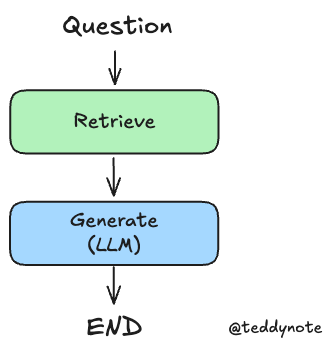
- Naive RAG 수행
1.1 환경 설정
1.2 기본 PDF 기반 Retrieval Chain 생성
여기서는 PDF 문서를 기반으로 Retrieval Chain 을 생성합니다. 가장 단순한 구조의 Retrieval Chain 입니다.
단, LangGraph 에서는 Retirever 와 Chain 을 따로 생성합니다. 그래야 각 노드별로 세부 처리를 할 수 있습니다.
from rag.pdf import PDFRetrievalChain

# PDF 문서를 로드합니다.
pdf = PDFRetrievalChain(["data/SPRI_AI_Brief_2023년12월호_F.pdf"]).create_chain()

# retriever와 chain을 생성합니다.
pdf_retriever = pdf.retriever
pdf_chain = pdf.chain
먼저, pdf_retriever 를 사용하여 검색 결과를 가져옵니다.
이전에 검색한 결과를 chain 의 context 로 전달합니다.
1.3 State 정의
State: Graph 의 노드와 노드 간 공유하는 상태를 정의합니다.
일반적으로 TypedDict 형식을 사용합니다.
from typing import Annotated, TypedDict
from langgraph.graph.message import add_messages


# GraphState 상태 정의
class GraphState(TypedDict):
    question: Annotated[str, "Question"]  # 질문
    context: Annotated[str, "Context"]  # 문서의 검색 결과
    answer: Annotated[str, "Answer"]  # 답변
    messages: Annotated[list, add_messages]  # 메시지(누적되는 list)
1.4 노드(Node) 정의
Nodes: 각 단계를 처리하는 노드입니다. 보통은 Python 함수로 구현합니다. 입력과 출력이 상태(State) 값입니다.
참고
State를 입력으로 받아 정의된 로직을 수행한 후 업데이트된State를 반환합니다.
from langchain_teddynote.messages import messages_to_history
from rag.utils import format_docs


# 문서 검색 노드
def retrieve_document(state: GraphState) -> GraphState:
    # 질문을 상태에서 가져옵니다.
    latest_question = state["question"]

    # 문서에서 검색하여 관련성 있는 문서를 찾습니다.
    retrieved_docs = pdf_retriever.invoke(latest_question)

    # 검색된 문서를 형식화합니다.(프롬프트 입력으로 넣어주기 위함)
    retrieved_docs = format_docs(retrieved_docs)

    # 검색된 문서를 context 키에 저장합니다.
    return {"context": retrieved_docs}


# 답변 생성 노드
def llm_answer(state: GraphState) -> GraphState:
    # 질문을 상태에서 가져옵니다.
    latest_question = state["question"]

    # 검색된 문서를 상태에서 가져옵니다.
    context = state["context"]

    # 체인을 호출하여 답변을 생성합니다.
    response = pdf_chain.invoke(
        {
            "question": latest_question,
            "context": context,
            "chat_history": messages_to_history(state["messages"]),
        }
    )
    # 생성된 답변, (유저의 질문, 답변) 메시지를 상태에 저장합니다.
    return {
        "answer": response,
        "messages": [("user", latest_question), ("assistant", response)],
    }
1.5 그래프 생성
Edges: 현재State를 기반으로 다음에 실행할Node를 결정하는 Python 함수.
일반 엣지, 조건부 엣지 등이 있습니다.
from langgraph.graph import END, StateGraph
from langgraph.checkpoint.memory import MemorySaver

# 그래프 생성
workflow = StateGraph(GraphState)

# 노드 정의
workflow.add_node("retrieve", retrieve_document)
workflow.add_node("llm_answer", llm_answer)

# 엣지 정의
workflow.add_edge("retrieve", "llm_answer")  # 검색 -> 답변
workflow.add_edge("llm_answer", END)  # 답변 -> 종료

# 그래프 진입점 설정
workflow.set_entry_point("retrieve")

# 체크포인터 설정
memory = MemorySaver()

# 컴파일
app = workflow.compile(checkpointer=memory)
컴파일한 그래프를 시각화 합니다.
1.6 그래프 실행
config파라미터는 그래프 실행 시 필요한 설정 정보를 전달합니다.recursion_limit: 그래프 실행 시 재귀 최대 횟수를 설정합니다.inputs: 그래프 실행 시 필요한 입력 정보를 전달합니다.
참고
- 메시지 출력 스트리밍은 LangGraph 스트리밍 모드의 모든 것 을 참고해주세요.
아래의 stream_graph 함수는 특정 노드만 스트리밍 출력하는 함수입니다.
손쉽게 특정 노드의 스트리밍 출력을 확인할 수 있습니다.
from langchain_core.runnables import RunnableConfig
from langchain_teddynote.messages import invoke_graph, stream_graph, random_uuid

# config 설정(재귀 최대 횟수, thread_id)
config = RunnableConfig(recursion_limit=20, configurable={"thread_id": random_uuid()})

# 질문 입력
inputs = GraphState(question="앤스로픽에 투자한 기업과 투자금액을 알려주세요.")

# 그래프 실행
invoke_graph(app, inputs, config)