1 대화 기록 요약을 추가하는 방법
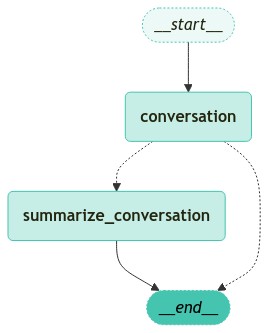
대화 기록을 유지하는 것은 지속성의 가장 일반적인 사용 사례 중 하나입니다. 이는 대화를 지속하기 쉽게 만들어주는 장점이 있습니다.
하지만 대화가 길어질수록 대화 기록이 누적되어 context window를 더 많이 차지하게 됩니다. 이는 LLM 호출이 더 비싸고 길어지며, 잠재적으로 오류가 발생할 수 있어 바람직하지 않을 수 있습니다. 이를 해결하기 위한 한 가지 방법은 현재까지의 대화 요약본을 생성하고, 이를 최근 N 개의 메시지와 함께 사용하는 것입니다.
이 가이드에서는 이를 구현하는 방법의 예시를 살펴보겠습니다.
다음과 같은 단계가 필요합니다.
- 대화가 너무 긴지 확인 (메시지 수나 메시지 길이로 확인 가능)
- 너무 길다면 요약본 생성 (이를 위한 프롬프트 필요)
- 마지막
N개의 메시지를 제외한 나머지 삭제
이 과정에서 중요한 부분은 오래된 메시지를 삭제(DeleteMessage) 하는 것입니다.
1.1 환경 설정
1.2 긴 대화를 요약하여 대화로 저장
긴 대화에 대하여 요약본을 생성한 뒤, 기존의 대화를 삭제하고 요약본을 대화로 저장합니다.
조건
- 대화의 길이가 6개 초과일 경우 요약본을 생성
from typing import Literal, Annotated
from langchain_openai import ChatOpenAI
from langchain_core.messages import SystemMessage, RemoveMessage, HumanMessage
from langgraph.checkpoint.memory import MemorySaver
from langgraph.graph import MessagesState, StateGraph, START
from langgraph.graph.message import add_messages

# 메모리 저장소 설정
memory = MemorySaver()


# 메시지 상태와 요약 정보를 포함하는 상태 클래스
class State(MessagesState):
    messages: Annotated[list, add_messages]
    summary: str


# 대화 및 요약을 위한 모델 초기화
model = ChatOpenAI(model_name="gpt-4o-mini", temperature=0)
ask_llm 노드는 messages 를 llm 에 주입하여 답변을 얻습니다.
만약, 이전의 대화 요약본이 존재한다면, 이를 시스템 메시지로 추가하여 대화에 포함시킵니다.
하지만, 이전의 대화 요약본이 존재하지 않는다면, 이전의 대화 내용만 사용합니다.
def ask_llm(state: State):
    # 이전 요약 정보 확인
    summary = state.get("summary", "")

    # 이전 요약 정보가 있다면 시스템 메시지로 추가
    if summary:
        # 시스템 메시지 생성
        system_message = f"Summary of conversation earlier: {summary}"
        # 시스템 메시지와 이전 메시지 결합
        messages = [SystemMessage(content=system_message)] + state["messages"]
    else:
        # 이전 메시지만 사용
        messages = state["messages"]

    # 모델 호출
    response = model.invoke(messages)

    # 응답 반환
    return {"messages": [response]}
should_continue 노드는 대화의 길이가 6개 초과일 경우 요약 노드로 이동합니다.
그렇지 않다면, 즉각 답변을 반환합니다. (END 노드로 이동)
from langgraph.graph import END


# 대화 종료 또는 요약 결정 로직
def should_continue(state: State) -> Literal["summarize_conversation", END]:
    # 메시지 목록 확인
    messages = state["messages"]

    # 메시지 수가 6개 초과라면 요약 노드로 이동
    if len(messages) > 6:
        return "summarize_conversation"
    return END
summarize_conversation 노드는 대화 내용을 요약하고, 오래된 메시지를 삭제합니다.
# 대화 내용 요약 및 메시지 정리 로직
def summarize_conversation(state: State):
    # 이전 요약 정보 확인
    summary = state.get("summary", "")

    # 이전 요약 정보가 있다면 요약 메시지 생성
    if summary:
        summary_message = (
            f"This is summary of the conversation to date: {summary}\n\n"
            "Extend the summary by taking into account the new messages above in Korean:"
        )
    else:
        # 요약 메시지 생성
        summary_message = "Create a summary of the conversation above in Korean:"

    # 요약 메시지와 이전 메시지 결합
    messages = state["messages"] + [HumanMessage(content=summary_message)]
    # 모델 호출
    response = model.invoke(messages)
    # 오래된 메시지 삭제
    delete_messages = [RemoveMessage(id=m.id) for m in state["messages"][:-2]]
    # 요약 정보 반환
    return {"summary": response.content, "messages": delete_messages}
# 워크플로우 그래프 초기화
workflow = StateGraph(State)
# 대화 및 요약 노드 추가
workflow.add_node("conversation", ask_llm)
workflow.add_node(summarize_conversation)
# 시작점을 대화 노드로 설정
workflow.add_edge(START, "conversation")
# 조건부 엣지 추가
workflow.add_conditional_edges(
"conversation",
should_continue,
)
# 요약 노드에서 종료 노드로의 엣지 추가
workflow.add_edge("summarize_conversation", END)
# 워크플로우 컴파일 및 메모리 체크포인터 설정
app = workflow.compile(checkpointer=memory)그래프를 시각화합니다.
1.3 그래프 실행
# 업데이트 정보 출력 함수
def print_update(update):
    # 업데이트 딕셔너리 순회
    for k, v in update.items():
        # 메시지 목록 출력
        for m in v["messages"]:
            m.pretty_print()
        # 요약 정보 존재 시 출력
        if "summary" in v:
            print(v["summary"])
# 메시지 핸들링을 위한 HumanMessage 클래스 임포트
from langchain_core.messages import HumanMessage
# 스레드 ID가 포함된 설정 객체 초기화
config = {"configurable": {"thread_id": "1"}}
# 첫 번째 사용자 메시지 생성 및 출력
input_message = HumanMessage(content="안녕하세요? 반갑습니다. 제 이름은 테디입니다.")
input_message.pretty_print()
# 스트림 모드에서 첫 번째 메시지 처리 및 업데이트 출력
for event in app.stream({"messages": [input_message]}, config, stream_mode="updates"):
print_update(event)
# 두 번째 사용자 메시지 생성 및 출력
input_message = HumanMessage(content="제 이름이 뭔지 기억하세요?")
input_message.pretty_print()
# 스트림 모드에서 두 번째 메시지 처리 및 업데이트 출력
for event in app.stream({"messages": [input_message]}, config, stream_mode="updates"):
print_update(event)
# 세 번째 사용자 메시지 생성 및 출력
input_message = HumanMessage(content="제 직업은 AI 연구원이에요")
input_message.pretty_print()
# 스트림 모드에서 세 번째 메시지 처리 및 업데이트 출력
for event in app.stream({"messages": [input_message]}, config, stream_mode="updates"):
print_update(event)지금까지는 요약이 전혀 이루어지지 않은 것을 확인할 수 있습니다 - 이는 목록에 메시지가 6개밖에 없기 때문입니다.
이제 다른 메시지를 보내보겠습니다
# 사용자 입력 메시지 객체 생성
input_message = HumanMessage(
    content="최근 LLM 에 대해 좀 더 알아보고 있어요. LLM 에 대한 최근 논문을 읽고 있습니다."
)

# 메시지 내용 출력
input_message.pretty_print()

# 스트림 이벤트 실시간 처리 및 업데이트 출력
for event in app.stream({"messages": [input_message]}, config, stream_mode="updates"):
    print_update(event)
현재 상태를 확인하면 대화의 요약과 함께 마지막 두 개의 메시지를 볼 수 있습니다.
이제 대화를 재개할 수 있습니다.
마지막 두 개의 메시지만 있더라도 이전 대화 내용에 대해 질문할 수 있습니다 (이전 내용이 요약되어 있기 때문입니다).