Hugging Face Hub은 12만 개 이상의 모델, 2만 개의 데이터셋, 5만 개의 데모 앱(Spaces)을 보유한 플랫폼으로, 모두 오픈 소스이며 공개적으로 사용 가능합니다. 이 온라인 플랫폼에서 사람들은 쉽게 협업하고 함께 머신러닝을 구축할 수 있습니다.
Hugging Face Hub은 또한 다양한 ML 애플리케이션을 구축하기 위한 다양한 엔드포인트를 제공합니다. 이 예제는 다양한 유형의 엔드포인트에 연결하는 방법을 보여줍니다.
특히, 텍스트 생성 추론은 Text Generation Inference에 의해 구동됩니다. 이는 매우 빠른 텍스트 생성 추론을 위해 맞춤 제작된 Rust, Python, gRPC 서버입니다.
1 허깅페이스 토큰 발급
허깅페이스(https://huggingface.co) 에 회원가입을 한 뒤, 아래의 주소에서 토큰 발급을 신청합니다.
- 토큰 발급주소: https://huggingface.co/docs/hub/security-tokens
2 참고 모델 리스트
- 허깅페이스 LLM 리더보드: https://huggingface.co/spaces/HuggingFaceH4/open_llm_leaderboard
- 모델 리스트: https://huggingface.co/models?pipeline_tag=text-generation&sort=downloads
- LogicKor 리더보드: https://lk.instruct.kr/
3 Huggingface Endpoints 사용
사용하기 위해서는 Python의 huggingface_hub 패키지를 설치해야 합니다.
.env 파일에 이미 발급받은 토큰을 HUGGINGFACEHUB_API_TOKEN 을 저장한 뒤 다음 단계롤 진행합니다.
HUGGINGFACEHUB_API_TOKEN 을 불러옵니다.
# LangSmith 추적을 설정합니다. https://smith.langchain.com
# !pip install langchain-teddynote
from langchain_teddynote import logging

# 프로젝트 이름을 입력합니다.
logging.langsmith("CH04-Models")
허깅페이스 토큰을 입력합니다
간단한 프롬프트를 생성합니다.
4 Serverless Endpoints
Inference API 는 무료로 사용할 수 있으며 요금은 제한되어 있습니다. 프로덕션을 위한 추론 솔루션이 필요한 경우, Inference Endpoints 서비스를 확인하세요. Inference Endpoints 를 사용하면 모든 머신 러닝 모델을 전용 및 완전 관리형 인프라에 손쉽게 배포할 수 있습니다. 클라우드, 지역, 컴퓨팅 인스턴스, 자동 확장 범위 및 보안 수준을 선택하여 모델, 지연 시간, 처리량 및 규정 준수 요구 사항에 맞게 설정하세요.
다음은 Inference API 에 액세스하는 방법의 예시입니다.
참고
repo_id 변수에 HuggingFace 모델의 repo ID(저장소 ID) 를 할당합니다. - microsoft/Phi-3-mini-4k-instruct 모델: https://huggingface.co/microsoft/Phi-3-mini-4k-instruct
import os
from langchain_core.output_parsers import StrOutputParser
from langchain_huggingface import HuggingFaceEndpoint

# 사용할 모델의 저장소 ID를 설정합니다.
repo_id = "microsoft/Phi-3-mini-4k-instruct"

llm = HuggingFaceEndpoint(
    repo_id=repo_id,  # 모델 저장소 ID를 지정합니다.
    max_new_tokens=256,  # 생성할 최대 토큰 길이를 설정합니다.
    temperature=0.1,
    task="text-generation",
    huggingfacehub_api_token=os.environ["HUGGINGFACEHUB_API_TOKEN"],  # 허깅페이스 토큰
)

# LLMChain을 초기화하고 프롬프트와 언어 모델을 전달합니다.
chain = prompt | llm | StrOutputParser()
# 질문을 전달하여 LLMChain을 실행하고 결과를 출력합니다.
response = chain.invoke({"question": "what is the capital of South Korea?"})
print(response)5 전용 엔드포인트(Dedicated Endpoint)
무료 서버리스 API를 사용하면 솔루션을 빠르게 구현하고 반복할 수 있습니다. 하지만 로드가 다른 요청과 공유되기 때문에 대용량 사용 사례에서는 속도 제한이 있을 수 있습니다.
엔터프라이즈 워크로드의 경우, Inference Endpoints - Dedicated를 사용하는 것이 가장 좋습니다. 이를 통해 더 많은 유연성과 속도를 제공하는 완전 관리형 인프라에 액세스할 수 있습니다.
이러한 리소스에는 지속적인 지원과 가동 시간 보장은 물론 AutoScaling과 같은 옵션도 포함됩니다.
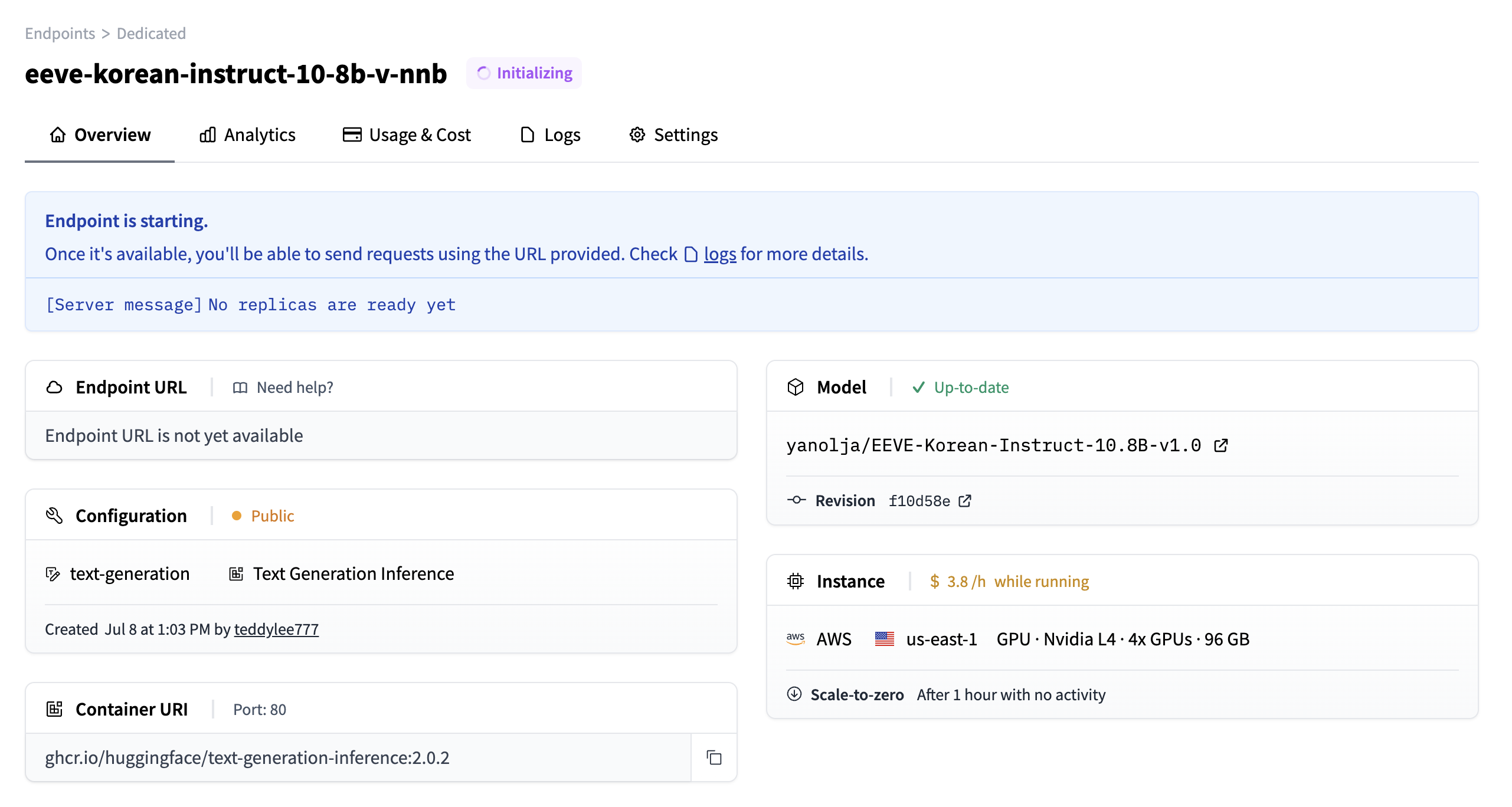
hf_endpoint_url변수에 Inference Endpoint의 URL을 설정합니다.
# Inference Endpoint URL을 아래에 설정합니다.
hf_endpoint_url = "https://slcalzucia3n7y3g.us-east-1.aws.endpoints.huggingface.cloud"
llm = HuggingFaceEndpoint(
# 엔드포인트 URL을 설정합니다.
endpoint_url=hf_endpoint_url,
max_new_tokens=512,
temperature=0.01,
task="text-generation",
)
# 주어진 프롬프트에 대해 언어 모델을 실행합니다.
llm.invoke(input="대한민국의 수도는 어디인가요?")from langchain_core.prompts import ChatPromptTemplate
from langchain_core.output_parsers import StrOutputParser
prompt = ChatPromptTemplate.from_messages(
[
(
"system",
"A chat between a curious user and an artificial intelligence assistant. "
"The assistant gives helpful, detailed, and polite answers to the user's questions.",
),
("user", "Human: {question}\nAssistant: "),
]
)
chain = prompt | llm | StrOutputParser()